By Ashley Waldron
@DisplayName
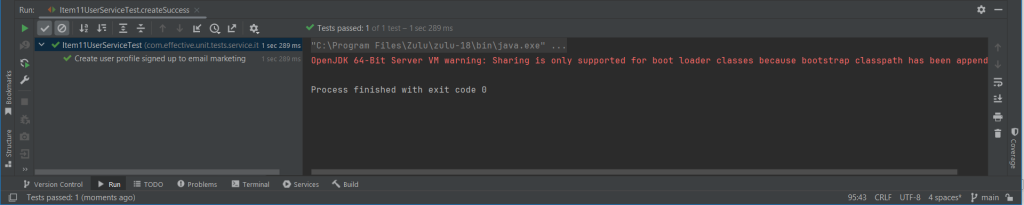
JUnit 5 introduced the new @DisplayName annotation so that developers could use more descriptive languages for their unit tests. So I would consider using it going forward to make test reports easier to read. I’ve never been a fan of the common unit test method naming conventions (and I’m pretty sure I’m not that good at it either), putting underscores in Java methods has never sat well with me :-), although that’s my problem. Using more descriptive language for unit test descriptions doesn’t really add any cost but should help describe what scenario each test is exercising. For example, for our tests you could do something like the below [Item11UserServiceTest.createSuccess()]:
@Test
@DisplayName("Create user profile signed up to email marketing")
void createSuccess() {
    given(userRepository.save(userEntityArgumentCaptor.capture())).willReturn(mockSavedUserEntity);
    given(employeeNumberGenerator.generate(TEST_REGION)).willReturn(TEST_EMPLOYEE_NUMBER);

    CreateUserProfileResponse createUserProfileResponse = item11UserService.create(createUserProfileRequest);

    assertThat(createUserProfileResponse.getEmployeeNumber(), is(equalTo(TEST_EMPLOYEE_NUMBER)));
    assertThat(createUserProfileResponse.getEmailAddress(), is(equalTo(TEST_EMAIL_ADDRESS)));
    assertThat(createUserProfileResponse.getRegion(), is(equalTo(TEST_REGION)));
    assertThat(createUserProfileResponse.getId(), is(equalTo(TEST_UUID)));

    assertThat(userEntityArgumentCaptor.getValue().getEmployeeNumber(), is(equalTo(TEST_EMPLOYEE_NUMBER)));
    assertThat(userEntityArgumentCaptor.getValue().getEmailAddress(), is(equalTo(TEST_EMAIL_ADDRESS)));
    assertThat(userEntityArgumentCaptor.getValue().getRegion(), is(equalTo(TEST_REGION)));
    assertThat(userEntityArgumentCaptor.getValue().getId(), matchesPattern(UUID_PATTERN));

    then(eventBroadcaster).should().broadcast(EventType.USER_REGISTRATION, mockSavedUserEntity);
    then(emailService).should().registerSubscriber(mockSavedUserEntity);
}
Which on my IDE prints the test report like this:
Parameterized Tests
Something similar can also be done for parameterized tests. Parameterized Tests were also introduced in JUnit 5 and can be used to run the same test multiple times with different arguments. This is useful for tests which verify validation logic is working as intended because those tests are usually the exact same test but with different input (and maybe output) arguments.
We have 2 tests which could be combined into a single test like this [Item11UserServiceTest.createWithInvalidRegionsTestA()]:
@ParameterizedTest
@MethodSource("invalidRegionsA")
void createWithInvalidRegionsTestA(String region) {
    createUserProfileRequest.setRegion(region);

    RuntimeException thrownException = assertThrows(RuntimeException.class, () -> item11UserService.create(createUserProfileRequest));

    assertThat(thrownException.getMessage(), is(equalTo("Region must be less than 30 characters in length")));
    then(employeeNumberGenerator).shouldHaveNoInteractions();
    then(userRepository).shouldHaveNoInteractions();
    then(emailService).shouldHaveNoInteractions();
    then(eventBroadcaster).shouldHaveNoInteractions();
}

private static Stream<Arguments> invalidRegionsA() {
    return Stream.of(
            arguments(new Object[]{null}),
            arguments("ThisRegionIs31CharactersLongThi")
    );
}
Which prints out the following report in my IDE:

But you can make the test names in the report more descriptive by changing things to [Item11UserServiceTest.createWithInvalidRegionsTestB()]:
@ParameterizedTest(name = "Scenario: {1}")
@MethodSource("invalidRegionsB")
void createWithInvalidRegionsTestB(String fieldValue, String testDisplayName) {
    createUserProfileRequest.setRegion(fieldValue);

    RuntimeException thrownException = assertThrows(RuntimeException.class, () -> item11UserService.create(createUserProfileRequest));

    assertThat(thrownException.getMessage(), is(equalTo("Region must be less than 30 characters in length")));
    then(employeeNumberGenerator).shouldHaveNoInteractions();
    then(userRepository).shouldHaveNoInteractions();
    then(emailService).shouldHaveNoInteractions();
    then(eventBroadcaster).shouldHaveNoInteractions();
}

private static Stream<Arguments> invalidRegionsB() {
    return Stream.of(
            arguments(null, "Region is null"),
            arguments("ThisRegionIs31CharactersLongThi", "Region has 31 characters")
    );
}
*Note: Unfortunately, the unused …String testDisplayName) method parameter in the test above is required for JUnit to resolve the {1} argument and display the text.
Which prints out:

Which is a bit nicer to read.
So going forward it’s a good idea to consider using these more descriptive ways to print out unit test reports so that there’s no confusion as to what scenario a test is testing or which permutations in a parameterized test have failed.